by Miserere
Yesterday's post by Yvon about printing photos from K20D files reminded me of the day I found out I had been lied to by the camera business. It was about 1 year ago.
I had been thinking about what present to get my parents for Christmas, and being that they were in Spain and I was in the US, it couldn't be anything big. It took me a while to realise that a photograph would make a great gift, especially if it were one I had taken. What would make it even better is if it were a photograph that was meaningful to them. I immediately knew which photographs they would like (I have a good memory for images and the majority of my "good" photographs are stored in my head...finding them on my hard drive is another story).
After a while of cursing under my breath at my appalling photo cataloguing system I found what I was looking for in the depths of my laptop disk. I thought about it for a while and decided that a photograph wouldn't do; I wanted to print a poster for each of them. These are the images I chose:
 © 2007 Miserere
The tiny village where my mother was born.
 © 2007 Miserere
Canes and farming utensils my grandfather left unfinished after his passing away.
I hadn't planned on visiting my parents for Christmas last year, but my lovely wife miraculously found us some cheap tickets and insisted that we go. I carried the poster tube with me across the Atlantic and over the Alps (we flew via Zurich) and was able to see my parents' faces when I gave them their gifts. They were very touched and it meant a lot to them emotionally.
What does all this have to do with printing sizes and being lied to? My mother's poster was printed approximately 20x26 inches (51x66 cm), while my father's was 15x26 inches (30.5x66 cm). Oh, and the photos were taken with a 6MP Pentax Optio S60 point-&-shoot. This computes to around 130ppi (pixels per inch). Of course, you cannot see the prints for yourselves, but I can assure you they look great from a normal viewing distance, and even close up they hardly appear pixelated. When I first saw those posters I knew for certain that you must print at least at 300ppi was an old photographer's wives' tale perpetuated by camera sellers wanting you to upgrade to the newest camera with higher megapixel count. I believe it to be (maybe) applicable to ink-jet printing, but not for prints we order online which are done on laser printers.
Those posters are now hanging in my parents' living room. And I'm glad I could make them so happy with so few ppi.
Merry Christmas, Mum & Dad!
Yesterday's post by Yvon about printing photos from K20D files reminded me of the day I found out I had been lied to by the camera business. It was about 1 year ago.
I had been thinking about what present to get my parents for Christmas, and being that they were in Spain and I was in the US, it couldn't be anything big. It took me a while to realise that a photograph would make a great gift, especially if it were one I had taken. What would make it even better is if it were a photograph that was meaningful to them. I immediately knew which photographs they would like (I have a good memory for images and the majority of my "good" photographs are stored in my head...finding them on my hard drive is another story).
After a while of cursing under my breath at my appalling photo cataloguing system I found what I was looking for in the depths of my laptop disk. I thought about it for a while and decided that a photograph wouldn't do; I wanted to print a poster for each of them. These are the images I chose:
 © 2007 Miserere
 © 2007 Miserere
I hadn't planned on visiting my parents for Christmas last year, but my lovely wife miraculously found us some cheap tickets and insisted that we go. I carried the poster tube with me across the Atlantic and over the Alps (we flew via Zurich) and was able to see my parents' faces when I gave them their gifts. They were very touched and it meant a lot to them emotionally.
What does all this have to do with printing sizes and being lied to? My mother's poster was printed approximately 20x26 inches (51x66 cm), while my father's was 15x26 inches (30.5x66 cm). Oh, and the photos were taken with a 6MP Pentax Optio S60 point-&-shoot. This computes to around 130ppi (pixels per inch). Of course, you cannot see the prints for yourselves, but I can assure you they look great from a normal viewing distance, and even close up they hardly appear pixelated. When I first saw those posters I knew for certain that you must print at least at 300ppi was an old photographer's wives' tale perpetuated by camera sellers wanting you to upgrade to the newest camera with higher megapixel count. I believe it to be (maybe) applicable to ink-jet printing, but not for prints we order online which are done on laser printers.
Those posters are now hanging in my parents' living room. And I'm glad I could make them so happy with so few ppi.
Merry Christmas, Mum & Dad!


 ABOVE: This is the original file in color taken with the K20D and the DA 16-45mm as I recall.
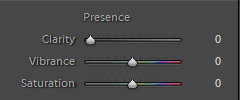
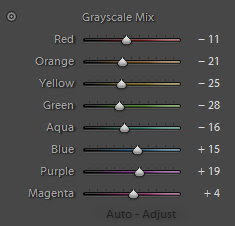
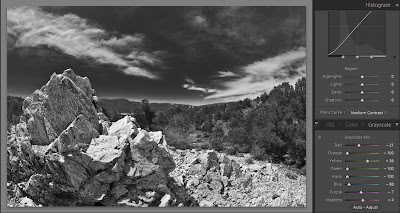
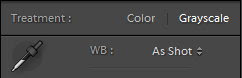 ABOVE: I usually add clarity and vibrance to the image before turning it to grayscale. When the Clarity and Vibrance are to my taste, I change the image to Grayscale.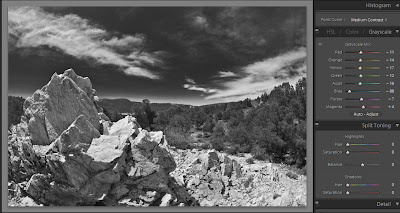
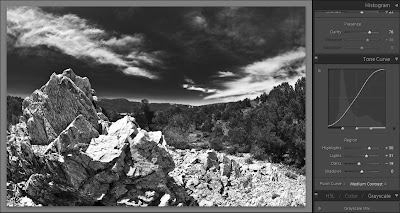

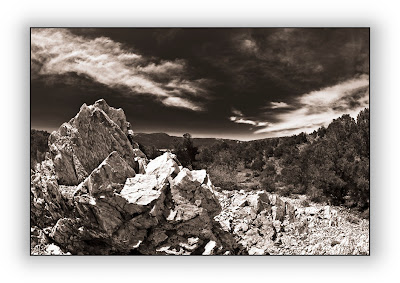
 ABOVE: Th is the original image. Below is the B & W after processing.