Showing posts with label Photoshop. Show all posts

Thursday, November 20, 2008

Get Lightroom 2, Photoshop Extended CS4, and other software at up to 75% DISCOUNT. This is real and legal. Cet article est aussi en français.

Cet article est aussi en français au bas de la page.

Hi Pentax Friends,

We all want to have the best post-processing software at our disposition. Photoshop Lightroom 2 is listed at $299.00. Photoshop Extended CS4 is listed at $999.00. Office Professional 2007 sells for $499.95. That's enough to purchase a Pentax K20D, the battery grip and the DA* 16-50mm f/2.8.

I don't know about you, but I cannot afford software that expensive. On one hand, I'd rather buy a DSLR or satisfy my LBA (Lens Buying Addiction) instead of purchasing the software. On the other hand, I really want post-processing software that allows me the greatest flexibility.

Well, what would you think if I'd tell you that you could have Lightroom for $98.95, or Photoshop extended CS4 for only $298.95? What about Office Professional 2007 for $119.95?

Well, you can; it's all legal and you actually get the software from the manufacturer, the same exact software that you would usually find for about three times the price. The treasure trove is Academic Superstore.

All of us have a child, or a spouse or we ourselves attend school or community college. That's all you need to get 60% to 75% off on software and other computer related items. If you read between the lines, maybe your brother or sister or uncle, or niece or nephew attend school. They can buy the software and loan it to you!

So...what are you waiting for? Get the best of the best now. I know I am. I did purchase Lightroom 1 a while back and it really is as advertized.


Hope this can help some of you, and thank you for reading,

Yvon Bourque
_______________________________________________________
Salut a tout mes amis d’appareille photographique Pentax,

Nous voulons tous avoir les meilleurs logiciels à notre disposition. Photoshop Lightroom 2 ce vent à $299.00 U.S. Photoshop CS4 ce vent à $999.00 U.S. « Microsoft office Professionnel 2007 » de bureau pour $499.95.

C’est assez pour acheter un DSLR Pentax K20D, la poignée avec batteries et une lentille DA* 16-50mm f/2.8. Je n’ais pas les moyens d’acheter des logiciels si cher. J’achèterais plutôt un DSLR ou satisferais mon
(LBA) au lieu d'acheter le logiciel a plein prix.

D'une part, je veux vraiment un logiciel de post-traitement qui me permet la plus grande flexibilité. D'une autre part, je ne veus pas payer plus cher que le prix d'une camera.

Bien, que penseriez vous s’il serait possible d’obtenir Lightroom pour $98.95 U.S, ou Photoshop CS4 pour seulement $298.95 ? Que diriez-vous de « Microsoft office Professionnel 2007 » pour $119.95 ?

Bien, c’est possible ! Tout est légal et vous obtiendrez le logiciel du fabricant, le même logiciel que vous trouveriez habituellement pour environ trois fois plus cher.

Le trésor est
Hypermarché Scolaire. Nous avons tous des enfants, ou un conjoint ou nous-mêmes qui allons à l'école ou à une Institue de Formation Supérieure. Vous pouvez obtenir 60% à 75% de discompte sur les logiciels et d'autres articles pour votre ordinateur. Si vous lisez entre les lignes, peut-être que votre frère, ou sœur, ou oncle, ou nièce, ou neveu vont à l'école. Ils peuvent acheter les logiciels et vous les prêter! Alors… qu’attendez vous? Prenez avantage de ces bas prix. J'ai acheté Lightroom 1 dernièrement, et il est vraiment comme annoncé. Je me demande s’il est possible d’acheter ces logiciels en dehors des Etats-Unis ?

Merci,

Yvon Bourque

Wednesday, December 26, 2007

Pentax DSLR Photographers...Photoshop CS3, Lightroom or Elements?

2nd edition, 12/27/07 @ 9:18 P.M.

I use a Pentax K10D for almost all of my photographic endeavors. Most all DSLR makers make a camera that fits your needs and budget. It would be nice to have one of each.
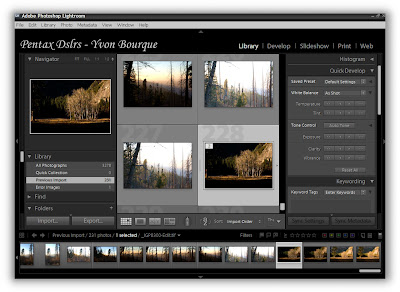
Figure 1 of 7
The above Figure shows the Library screen of Photoshop Lightroom. At the bottom, all my pictures in that folder are shown as small thumbnails. To the upper left, this is the picture I am choosing. In the middle, are larger thumbnails of my chosen image and the images surrounding it. I coud have shown the chosen image full size.

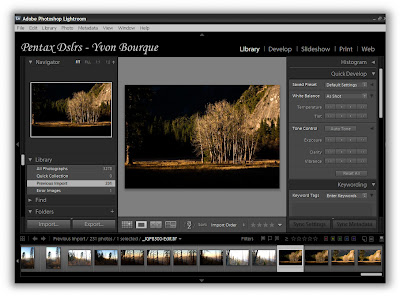
Figure 2 of 7
Here is the chosen image in full size in the middle screen.

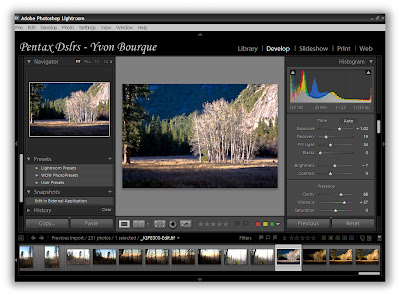
Figure 3 of 7
Now we are changing mode from library to the develop mode. This is where I can change the white balance, the histogram, saturation, luminance, even correcting the lens chromatic aberration or vignetting. You can't do that in Elements.

One of the best imaging software is, (in this photographer’s opinion anyway) Adobe Photoshop CS3. However, Photoshop Lightroom is becoming one of the most versatile software used by Digital Photographers. Photoshop Elements, now released in version 6.0, is also a good alternative for entry-level to advanced hobbyists. It seems that photographers using all brands of cameras, from Nikon to Canon, Pentax to Olympus, Sony and all the other brands, all have one thing in common…Adobe Photoshop family of software. There is no question that if money is no problem, or if you make your living from photography, Photoshop CS3 or CS3 Extended is likely your overall best choice. That is not to say that Professional photographers are better at the craft. It is to say that since Professional photographers make their living from taking pictures, they need the best tools on the market. They need the current leader in image manipulation as well as a reliable indexing system, capable of handling thousands of files. Their business depends on it, and it is a competitive market.

Aren’t there more hobbyist photographers in the world than there are Professional Photographers? I believe so. Are the final results of using the top-of-the-line software that much better than using affordable software such as Lightroom and Elements? Well, I don’t think so. Pros don’t have as much time on their hands as hobbyists have. They need to get the best pictures out as quickly as possible. For Pros, time is money. For hobbyists, time is just...well... more fun time doing what you like. I believe that equivalent results can be achieved with more economical software, but it takes more or your time to get there. If you’re a hobbyist, you like spending as much time as possible doing what you like anyway...such as photography, don't you?. But wait a minute you say…spending hours in front of a computer screen, working on images isn’t exactly photography, or is it? I’m afraid that if you have chosen Digital Photography over Film based Photography; computers are part of the equation. You can print your digital photos directly from the camera, but if you want to do that, get a point-and-shoot. This would also be the equivalent of yesteryear’s hobbyists bringing a roll of 35mm film to the corner drug store for developing and printing. The final results were left to the eighteen years old employee running the Kodak developing machine. More often than not, the machine was not cleaned as per the vendor’s specifications. You never knew what your pictures were going to look like. Of course you could have built your own darkroom, play with chemicals, learn the sophisticated craft, stay in the darkroom for hours, and spend tons of money. Fun! Nowadays, a few hours spent in front of a computer screen seems tame compared to that, and what’s more, you have full control of your pictures from the moment after you press the shutter release to the final print or image.

Yes, there is a plethora of dedicated software packages available out there, but I would like to concentrate on Adobe Software only, as they are by far the most popular, aren’t they? Adobe Lightroom and Elements are my choices for entry-level to advance amateur photographers. If you shoot JPEG only, Elements does a real good job, and the new version 6.0 approaches the usability of CS3 in many ways. If you don’t shoot RAW yet, you should because Lightroom has changed everything. Lightroom helps you make the transition from being a “JPEG only shooter” to a “RAW most of the times shooter” as easy as possible. Yes, you can shoot in JPEG for conserving space or for the internet, but RAW is really the wave of the very near future. Soon, JPEG will be a format of the past or for the internet only. Just wait and see. Computers are getting faster all the time and memory is cheaper than ever. That trend will continue.Lightroom was designed with input from photographers from all over the world. That was a smart move from Adobe. It’s really oriented toward photographers as the workflow structure is similar to what most photographers would intuitively do.

None-the-less, Lightroom is still a great tool even if you have CS3. They compliment each other. It is easier to use than CS3 and is also great for manipulating RAW images. Final touch can be achieved with CS3. The ideal combination for Professional Photographers is indeed Lightroom and CS3.


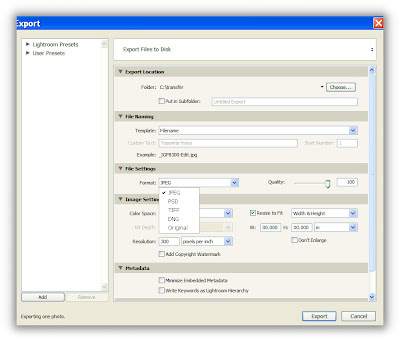
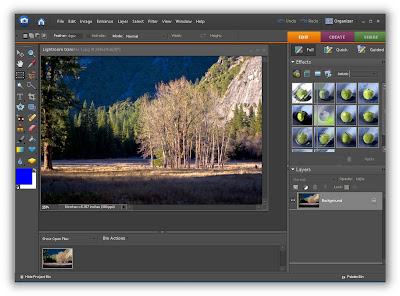
Figure 4 of 7
After I am satisfied with the modifications, I transfer the RAW file to Photoshop Elements directly from the Lightroom screen. It will be exported to Elements as a JPEG file. I could have chosen TIFF or other types of file as well.


Figure 5 of 7
You see how the new Elements 6.0 looks like Lightroom. They compliment each other. Here, I can resize my file, use tools such as dodging and burning, until I get what I want for this particular instance.


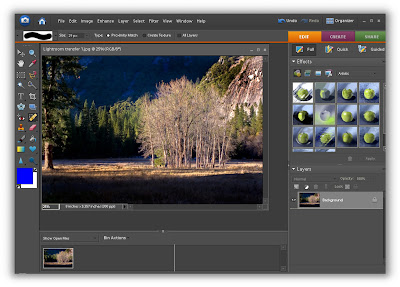
Figure 6 of 7
I decided to darken part of the photo and to concentrate on the sun rays hitting the trees and mountain behind. I used dodging and burning to achieve that by applying it to some portion of the photo only. You can't do that in Lightroom. That's why they complement each other.


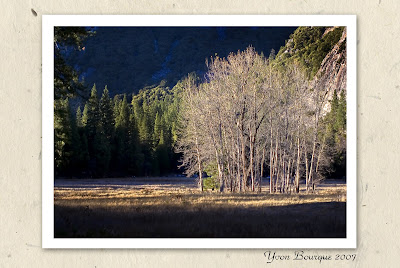
Figure 7 of 7 I finished by inserting a frame around my image and added my name to the final photo. After that I printed the image as seen above.

The ideal combination for non-professional photographers, on a budget, is to use Lightroom in conjunction with Elements version 6.0. I like version 6.0 because the screen looks a lot like Lightroom whereas the background is dark grey and black and seems to compliment Lightroom. There are also some important improvements from version 5.0. Lightroom will manipulate all file formats, from RAW, PSD, TIFF, DNG and JPEG, with more correction latitude than Elements. What I find nice is that you can shoot RAW and manipulate the white balance, colors, saturation, etc, in Lightroom, then convert the final image to JPEG and send it to Elements, right from the Lightroom screen. Why do that? For one thing, you can now shoot RAW with ease. Then, by sending the file in JPEG to Elements, you keep the original RAW files intact in Lightroom and the JPEG files on Elements. Once sized properly, JPEG files will print just as good and faster on Elements. You can index all JPEG files in Elements for printing or e-mailing, etc. The files are smaller. And when you want to print a very big image, you can go back to Lightroom where the original intact RAW file is located and manipulate the image from the original. You can index all the RAW files in Lightroom and the JPEG files in Elements.

Note: I read somewhere an analogy of RAW and JPEG files compared to a RAW and cooked steak. You can take the RAW steak and broil it or BBQ it, or bake it, etc. If the steak was a JPEG (Already cooked) , say broiled, you could never change it to a BBQ steak and keep it acceptable. Once cooked, you can't go back to the RAW steak and start over. You are stuck with the cooking method you chose to begin with.

Lightroom is expensive you say? Let me tell you how you can still get Lightroom for less than $100.00. Certainly, you must have a spouse, or a child, or a brother or a sister, or a nephew or a niece that is still going to school or college or teaching at a K12 or higher school. Get them to buy the software for you. There are Hughes discounts for students and teachers. Here is one place, Discount Place . There are many other similar discount sites.This is not really cheating, as a real student or teacher is purchasing the software. Since they happen to live with you, you can just use their computer to do your photographic work. They are sharing their computer with you. You know what I mean.

Please leave your comments or opinions here or in the forum. In addition, it would be nice to know what of the categories below you fit in.

Are you an entry-level photographer, a hobbyist or a Professional Photographer? What platform are you using, PC or MAC? What software are you using, and why? What brand of DSLR are you using?

You can also email me. info@k10dbook.com

Thank you for reading,

Yvon Bourque