Showing posts with label Lightroom. Show all posts

Tuesday, February 11, 2014

Revive old images taken with a 3.39 megapixels camera using Lightroom.

Email: brqyvn@gmail.com

 Hi Photographer friends,

I posted a while back about keeping your pictures that were well composed but with an incorrect exposure. My point was that someday, software would be available to correct the badly exposed images. Every year, new software packages are introduced with more and more capabilities. The pictures below were taken with digital cameras between 1998 and 2000. One camera had 3.39 megapixels. 

Using Lightroom 5.3, I was able to revive some pictures, even more than I did before. I think they were all well composed , but the exposure and other factors keep me from doing anything with these images, except for keeping them in my photo files.

I cannot make them bigger and expect great results, but by using today's tools, I think they are acceptable for computer screen viewing and emails, or even Facebook and other social media places.

Here's what I did.
I tweaked the color and made them more vivid. I used Lightroom's Clarity slider, then the sharpening slider (to the right) and finally the Noise Reduction and Luminance. It makes the images look slightly like a water color print, but hides all of the imperfections.

In the end, photography is an Art and what ever pleases you or the viewers, is okay. 


Thank you for reading,
Yvon Bourque

Visit my e-commerce store for e-books for all Pentax DSLRs from the K10D to the K-3.


Tuesday, January 6, 2009

The necessary Evils of Digital Photography.

Hi Pentaxian friends,

There are no doubt that digital photography has surpassed the film era with image quality, ease of use, instant dismay or pleasure (depending on your photographic aptitudes) and overall cost per image. Long gone are the wait for your slides or prints to come back from the Photo Lab. I guess it’s hog’s heaven for photographers all over the world.

Not so fast, I say! We all have to deal with the necessary Evils of digital photography. Shoeboxes full of prints and negatives have disappeared (I still have mine and they are chuck full of memories all cramped within the perimeter of my shoeboxes). Our images are now trusted to the “not-so-reliable” computers, hard drives and software, all destined to fail eventually.
(The cartoom character looks like Larry King, doesn't he?)

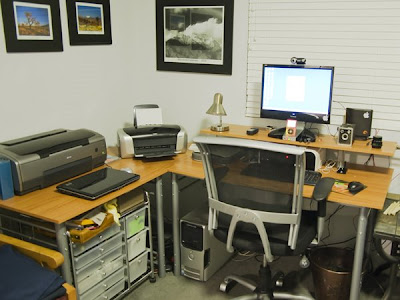
Case in point; it was the night before Christmas...when I had the brilliant idea of purchasing a new 320Gig hard drive. My photo station is a Dell computer with Dual processors running at 2.80 GHz and with 4 GB of RAM. I run Windows XP Professional with service pack 3, and use Photoshop Lightroom 2.2 and Elements V.7 for most of my post processing. I have an external 500GB hard drive for backup and the computer came with an 80Gig hard drive. It sounds like I know what I'm talking about, but I don't. I just know the lingo.


My decision to upgrade came after my computer slowed down with the main hard drive being at about 90% full. It got harder and harder to defragment the drive. I needed another drive so that my images could be stored on board the PC, on another drive than the "C" drive, and were quickly accessible. After all, the external hard drive is really just for security back up.

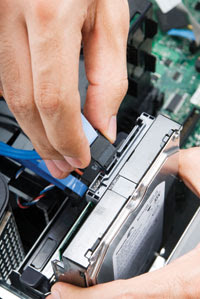
For those of you that use a Dell computer, although excellent machines and priced very competitively, you know that just about everything you purchase to upgrade should really be purchased from Dell, for compatibility. So I purchase and received the 320Gig drive and was excited to proceed to its installation. Surprise! I purchased the drive as a slave and wouldn’t you know, Dell forgot to send a SATA cable along. I drove to my local BEST BUY store. The sales person, was quick to tell me that they didn’t carry those kind of cables. I was walking toward the exit door when I questioned myself about the knowledge of the young lady. Wouldn’t you know it, there were several cables hanging on the pegboards, just waiting for the picking. After the physical installation, I had to format the drive, which took about two hours. There was my first night gone.


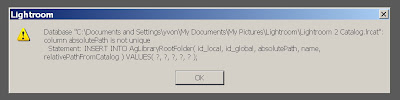
The following night, I transferred all of my image files from the “C” drive to my new “M” drive. That was a snap. I Started Lightroom and surprise again; my Catalogs were not right. There are no way, to my limited knowledge, to upgrade catalogs with new file locations. Lightroom was still looking for the files onthe "C" drive. It will not do a global search of all image files and catalog them automatically, at least not to my knowing. I’m certainly not a computer geek, I’m a photographer for goodness’ sake. So I had the stupid idea of doing a search for *.DNG files on all the drives. (I shoot RAW files only, saved in Adobe .DNG format) It gathered what I thought were all of the DNG files. I loaded them in Lightroom using “Import from drives”. Everything looked good, and I was able to see thumbnails of the files. The problem, as I switched from Library to Develop, remains that the software returns the following message: The file named “yada yada.dng” is offline or missing. I tried to import from: “Get photos from Photoshop Elements” which has all the image files tagged and cataloged. Here’s the message it returned. As you can see, it's really straight forward!


This has been going on for four days and who knows how long it will take to fix everything. I believe that I did loose some files along the upgrade and they were from the snowstorm we had, here in Sunny California, that comes by every thirty to forty years. In the meantime, I keep clicking with my Pentax DSLRs and getting new images.

It makes me cherish my Shoeboxes. I never had any problems with them. Oh, by the way, while reinstalling Lightroom to see if it would help, I got sucked into upgrading to the newer version 2.2. That’s another $99.00 down the drain, with no overall fix on the horizon. As I said before, I’m no computer geek, I’m a photographer, and a frustrated one at that.

Well, thank you all for being my sounding board. I was either going to write a blog about it or put my fist through the monitor. I’ll turn it off now and go to bed. Tomorrow’s another day. :-(

Yvon Bourque

Thursday, November 20, 2008

Get Lightroom 2, Photoshop Extended CS4, and other software at up to 75% DISCOUNT. This is real and legal. Cet article est aussi en français.

Cet article est aussi en français au bas de la page.

Hi Pentax Friends,

We all want to have the best post-processing software at our disposition. Photoshop Lightroom 2 is listed at $299.00. Photoshop Extended CS4 is listed at $999.00. Office Professional 2007 sells for $499.95. That's enough to purchase a Pentax K20D, the battery grip and the DA* 16-50mm f/2.8.

I don't know about you, but I cannot afford software that expensive. On one hand, I'd rather buy a DSLR or satisfy my LBA (Lens Buying Addiction) instead of purchasing the software. On the other hand, I really want post-processing software that allows me the greatest flexibility.

Well, what would you think if I'd tell you that you could have Lightroom for $98.95, or Photoshop extended CS4 for only $298.95? What about Office Professional 2007 for $119.95?

Well, you can; it's all legal and you actually get the software from the manufacturer, the same exact software that you would usually find for about three times the price. The treasure trove is Academic Superstore.

All of us have a child, or a spouse or we ourselves attend school or community college. That's all you need to get 60% to 75% off on software and other computer related items. If you read between the lines, maybe your brother or sister or uncle, or niece or nephew attend school. They can buy the software and loan it to you!

So...what are you waiting for? Get the best of the best now. I know I am. I did purchase Lightroom 1 a while back and it really is as advertized.


Hope this can help some of you, and thank you for reading,

Yvon Bourque
_______________________________________________________
Salut a tout mes amis d’appareille photographique Pentax,

Nous voulons tous avoir les meilleurs logiciels à notre disposition. Photoshop Lightroom 2 ce vent à $299.00 U.S. Photoshop CS4 ce vent à $999.00 U.S. « Microsoft office Professionnel 2007 » de bureau pour $499.95.

C’est assez pour acheter un DSLR Pentax K20D, la poignée avec batteries et une lentille DA* 16-50mm f/2.8. Je n’ais pas les moyens d’acheter des logiciels si cher. J’achèterais plutôt un DSLR ou satisferais mon
(LBA) au lieu d'acheter le logiciel a plein prix.

D'une part, je veux vraiment un logiciel de post-traitement qui me permet la plus grande flexibilité. D'une autre part, je ne veus pas payer plus cher que le prix d'une camera.

Bien, que penseriez vous s’il serait possible d’obtenir Lightroom pour $98.95 U.S, ou Photoshop CS4 pour seulement $298.95 ? Que diriez-vous de « Microsoft office Professionnel 2007 » pour $119.95 ?

Bien, c’est possible ! Tout est légal et vous obtiendrez le logiciel du fabricant, le même logiciel que vous trouveriez habituellement pour environ trois fois plus cher.

Le trésor est
Hypermarché Scolaire. Nous avons tous des enfants, ou un conjoint ou nous-mêmes qui allons à l'école ou à une Institue de Formation Supérieure. Vous pouvez obtenir 60% à 75% de discompte sur les logiciels et d'autres articles pour votre ordinateur. Si vous lisez entre les lignes, peut-être que votre frère, ou sœur, ou oncle, ou nièce, ou neveu vont à l'école. Ils peuvent acheter les logiciels et vous les prêter! Alors… qu’attendez vous? Prenez avantage de ces bas prix. J'ai acheté Lightroom 1 dernièrement, et il est vraiment comme annoncé. Je me demande s’il est possible d’acheter ces logiciels en dehors des Etats-Unis ?

Merci,

Yvon Bourque

Sunday, March 2, 2008

Continuation of the discussion about taking the plunge to RAW files.

Hi friends.

My post on Raw files was also displayed on several forums. I had the most comments from the Pentax Forum on Photo.net. Amongst all the comments, Charles Gravely took my post one notch up and I thought I would share it with you all. Charles has gracioulsy agreed to let me post his comments. Here goes...

Charles Gravely,Mar 01, 2008; 11:56 a.m.
Cool discussion - here's my experience -

I switched to Raw and I love it!

I think there is a misconception that Raw takes a lot of extra work. That was why I held off for so long. I don't have time to mess with these shots either - imagine having to tweak a hundred photographs or so after every time you go out with your camera - not a chance! I just don't have that kind of time on my hands.

The fact is, you don't have to do anything to them and they are still better than JPEG. Just download the files as normal and you are done. View them, sort them, enjoy them. The difference is, if you find one you like you can then go ahead and make it really great. This has nothing to do with the steep learning curve of photoshop. You don't need photoshop at all (unless you are into localized adjustments).

There are three down-sides to RAW
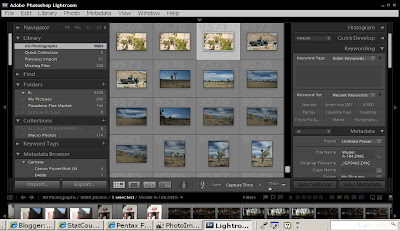
1) You have to replace your current photo sorting program with one that handles Raw files. There are a few contenders out there and they are all great. This does cost money. I paid about $300 for Lightroom.
2) They take up loads of space on your hard drive. Of course hard disk space is very cheap now. I will admit, when I switched to raw, I also added two new hard drives to my computer - one just for files and a second one just to have a redundant copy (RAID level 1). This cost me about $250 for 1T of storage - good for loads of photographs and a backup strategy you don't have to think about.
3) If you want to e-mail a photograph to someone, you have to export it to JPEG. Of course this is not really an extra step because even if you started with a JPEG you have to downsample to send to someone anyway. Convert to JPEG and downsample is single step that is done with batches of files in your photo sorting program of choice.

I did say you just download as normal and enjoy your photographs - no extra work. In fact, you do spend more time simply because it is so much fun to tweak the odd shot and add keywords for sorting. This is not because it is necessary but rather you get lured into it.

I started shooting digital (and film) when my daughter was born 8 years ago. Now that I have switched to raw and I am cataloging my old JPEGs in lightroom (about 12,000 shots). I have two regrets -

1) I wish I had organized my files better along the way with keywords etc.
2) I wish they were all raw because the JPEGs are simply stripped down raw files.

I believe the longer you wait to switch to raw, the greater your regret will be later when you realize that all shots up to that point are missing huge chunks of data that you were entitled to. There is no recovery.

I made the jump after viewing Michael Riechman's tutorial on Lightroom. This demonstrates exactly how raw files are handled and clears up many misconceptions about the work involved. Of course it only covers this particular program and there are others that are probably just as good. This is not a criticism because the tutorial is what it says it is - a lightoom tutorial. I believe it's only about $15 and it is unbelievable! It's worth the $15 before sinking $300 into Lightroom. I can't speak highly enough about this tutorial. And by the way, I have no association with Michael Richmann or his company.
Happy shooting Sincerely, Charles

Thank you Charles and thank you all for visiting my Blogsite.

Regards,

Yvon Bourque