Showing posts with label RAW. Show all posts

Wednesday, November 26, 2008

Shoot RAW and forget about the White Balance. The Pentax way.


Hi Pentaxian friends,

If you shoot with compact digital cameras, you don't have much choice but to shoot in JPG mode, although a few compact do have a choice of using RAW as well.

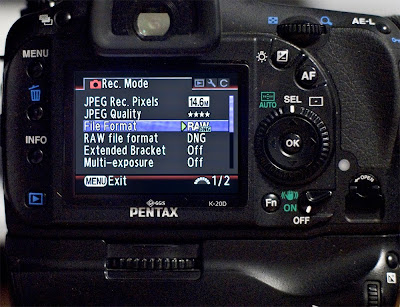
If you shoot with a DSLR, you have the choice of shooting in JPG or RAW as well. Most makers have their DSLRs limited to the use of their own proprietary RAW format, except for a few. Pentax DSLRs are in the few that allows you to shoot RAW PEF (Pentax proprietary format) and RAW DNG (Adobe attempt to universal RAW format).

So what does RAW and White Balance have to do with each other?

First of all, you should use RAW all the time, as this is like the negative of the film heyday, and the original information remains on the RAW files. JPG files are post-processed directly from your DSLR, reduced is size and the information lost is never recoverable.

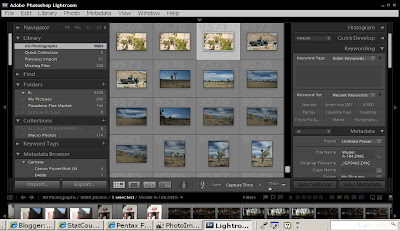
Now for the White Balance; There are plenty of White Balance filters, Expo-Discs, Expo-Caps, and other White-Balance gadgets and accessories, that in my opinion, are only effective if you use JPG format to begin with. In RAW format, the White Balance can be extensively manipulated in post-processing. Lightroom does an excellent job at that, but all post-processing software will do an adequate job. There are absolutely no differences in the final results with RAW format; whether the W/B is applied before or after taking the shot. So save yourself about $50.00 for these filters, shoot RAW and set your DSLR at Auto White-Balance and fix it as you please or as necessary in post-process. AWB will work just fine 90% of the time. Don’t let the manufacturer "in-camera" processor, with its limited power and with the manufacturer algorithms, do the JPG conversion for you. You will forever loose the ability to correct the W/B from the limited JPG file.

If you don’t shoot RAW yet...you will eventually. There are two types of DSLR users; the users that shoot RAW and those that will!

Thank you for reading,

Yvon Bourque

Monday, November 17, 2008

RAW revisited...again.

Hi pentaxian friends,

This article is not intended to be a highly technical dissertation. It is intended to be a real life shooting approach for better pictures.

Early in 2008, I posted several articles (Link) (Link) about shooting RAW. It seems that many photographers had reservations about shooting RAW. The most common reason was that RAW took too much space on the memory cards and that JPG were just fine for what they were shooting. Well, I think it’s time that you shoot RAW if you haven’t already done so. I just purchased an 8GB SDHC card for $49.00. With the K20D @ 14.6MP, that gives me 330 image files and 482 image files with the K200D. Long gone are the 128MB SD cards.

With the Pentax newer generation of DSLRs, you can shoot RAW-PEF (Pentax RAW format) or RAW-DNG (Adobe universal format). Some or most of the photo galleries even upload the DNG files, such as Google’s Picasa.

Therefore, why anyone would keep shooting JPG is beyond me.

RAW files are the “negatives” of the digital world. In the film era, the negatives were vital in making multiple prints or enlargements. With the negatives, through the lens of an enlarger, the development of the images on emulsion paper could be further modified with dodging, burning, as well as color corrections. You would never have thrown away negatives on purpose. The RAW files are the information recorded by the DSLR in it’s purest useable form. The images are recorded at 12-bit per channel color bit-depth. In simple terms, Pentax RAW files contain 4096 levels of information or tones per channel. JPG files are 8-bit and support only 256 levels of information or tones per channel. The more information you have saved, the better the end results will be.

JPG files are in-camera processed and compressed image files. The camera applies pre-determined settings for white balance, contrast, color correction, sharpening and saturation. The files are then compressed to reduce the sizes. The results; completed and processed image files written to the camera’s storage card. You can never go back to the original RAW files taken by the camera.

On the other hand, you can manipulate RAW files on a computer with much more latitude. Desktop computers have much more powerful tools to convert your RAW files to JPG, in a non-destructive way. The RAW files can be saved for future enhancements, if needed. (Actually, highly recommended). Who knows what new software will be coming out in the future?

Here is a neat trick you can use with RAW files. When the lighting is less than perfect, instead of pumping up the ISO, go ahead and under-expose by about 1 to 2 stops. (Instead of say f4 @ 1/60 sec as per the DSLR metering system, use f4 @ 1/250 sec.) Yes, the picture will be a little too dark. Later, using tools like Lightroom or similar software lighten up the image and you will have a tack-sharp image with minimal noise. Try it; you will see that it really works.

Thank you for reading,

Yvon Bourque
Tuesday, September 30, 2008

Good news for JPEG shooters

Hi Pentax friends,

Surfing the net this morning, I found this information on The Online Photographer (TOP).

A new free utility called Instant JPEG from RAW (IJFR) has just been released. It is not an application; it is a utility that attaches itself to the Windows or Mac operating systems. It also does not process or develop RAW files; it extracts the JPEG that's already in all your RAW files.
What are the benefits? No more shooting "RAW + JPEG" with most cameras. No more waiting for your converter to create JPEGs from large directories of RAW files. No more reason to shoot JPEG at all. The JPEG is there in the RAW file anyway, so when you shoot RAW you already have both. When you have the RAW file, it becomes easier to manipulate with Post processing.

More info:
Thanks for reading, and go ahead and shoot RAW files.

Regards,
Yvon Bourque
UPDATE: Anyone tried this new Instant JPEG from RAW (IJFR) ? If so, share your results with all of us in the comment section. Thanks.

Sunday, March 2, 2008

Continuation of the discussion about taking the plunge to RAW files.

Hi friends.

My post on Raw files was also displayed on several forums. I had the most comments from the Pentax Forum on Photo.net. Amongst all the comments, Charles Gravely took my post one notch up and I thought I would share it with you all. Charles has gracioulsy agreed to let me post his comments. Here goes...

Charles Gravely,Mar 01, 2008; 11:56 a.m.
Cool discussion - here's my experience -

I switched to Raw and I love it!

I think there is a misconception that Raw takes a lot of extra work. That was why I held off for so long. I don't have time to mess with these shots either - imagine having to tweak a hundred photographs or so after every time you go out with your camera - not a chance! I just don't have that kind of time on my hands.

The fact is, you don't have to do anything to them and they are still better than JPEG. Just download the files as normal and you are done. View them, sort them, enjoy them. The difference is, if you find one you like you can then go ahead and make it really great. This has nothing to do with the steep learning curve of photoshop. You don't need photoshop at all (unless you are into localized adjustments).

There are three down-sides to RAW

1) You have to replace your current photo sorting program with one that handles Raw files. There are a few contenders out there and they are all great. This does cost money. I paid about $300 for Lightroom.
2) They take up loads of space on your hard drive. Of course hard disk space is very cheap now. I will admit, when I switched to raw, I also added two new hard drives to my computer - one just for files and a second one just to have a redundant copy (RAID level 1). This cost me about $250 for 1T of storage - good for loads of photographs and a backup strategy you don't have to think about.
3) If you want to e-mail a photograph to someone, you have to export it to JPEG. Of course this is not really an extra step because even if you started with a JPEG you have to downsample to send to someone anyway. Convert to JPEG and downsample is single step that is done with batches of files in your photo sorting program of choice.

I did say you just download as normal and enjoy your photographs - no extra work. In fact, you do spend more time simply because it is so much fun to tweak the odd shot and add keywords for sorting. This is not because it is necessary but rather you get lured into it.

I started shooting digital (and film) when my daughter was born 8 years ago. Now that I have switched to raw and I am cataloging my old JPEGs in lightroom (about 12,000 shots). I have two regrets -

1) I wish I had organized my files better along the way with keywords etc.
2) I wish they were all raw because the JPEGs are simply stripped down raw files.

I believe the longer you wait to switch to raw, the greater your regret will be later when you realize that all shots up to that point are missing huge chunks of data that you were entitled to. There is no recovery.

I made the jump after viewing Michael Riechman's tutorial on Lightroom. This demonstrates exactly how raw files are handled and clears up many misconceptions about the work involved. Of course it only covers this particular program and there are others that are probably just as good. This is not a criticism because the tutorial is what it says it is - a lightoom tutorial. I believe it's only about $15 and it is unbelievable! It's worth the $15 before sinking $300 into Lightroom. I can't speak highly enough about this tutorial. And by the way, I have no association with Michael Richmann or his company.
Happy shooting Sincerely, Charles

Thank you Charles and thank you all for visiting my Blogsite.

Regards,

Yvon Bourque